

Where do I access my WireGuard configs?

Winder S
Feb 25, 2026

Once you have logged into your account on our website, you can download your WireGuard configs from the Config Generator tab in My Account.
WireGuard configs are only available to users with paid accounts. If you have a Pro account, you will have access to WireGuard configs for all locations.
If you have a Build-a-Plan account, you will only have access to WireGuard configs for your paid locations.
Open the WireGuard tab of the card.
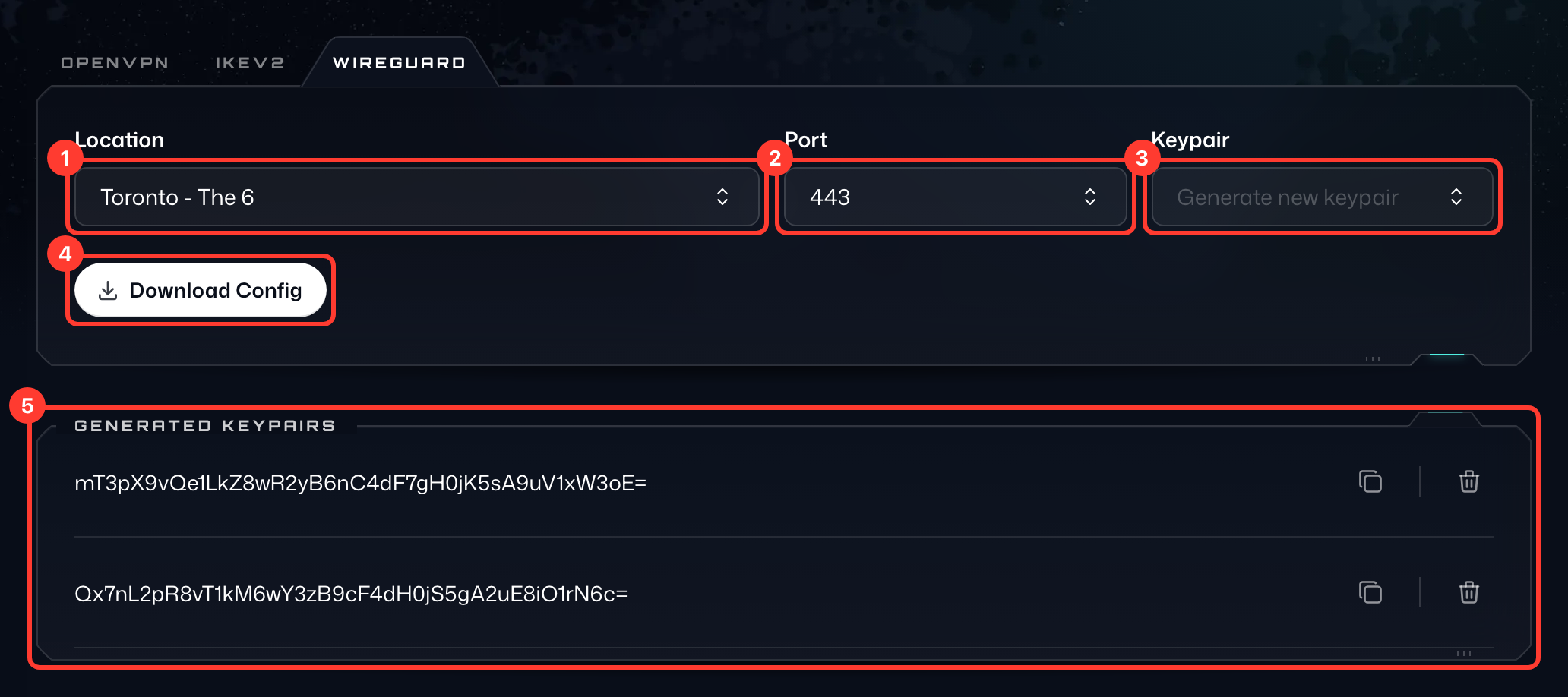
- To get the config, first select the Location (1) you want to connect to.
- Then choose a Port (2); use 443 if you're unsure.
- Under Keypair (3), keep Generate new keypair or pick a key pair you generated before.
- And finally, press Download Config (4) to get the WireGuard configuration file. You can open this file in a text editor to get all the specific details.
The key pairs you've generated are listed in the Generated Keypairs card (5) below, where you can copy or delete them.